Software testing usually starts with something simple.
A requirement.
A user story.
An acceptance criterion.
For example:
As a registered user,
I should be able to reset my password
using my registered email address.
A tester reads this and starts thinking.
What happens with a valid email?
What happens with an email that does not exist?
What if the reset link has expired?
Can the same link be used twice?
What password rules apply?
What if the email service is unavailable?
What happens if the user requests five reset links within a minute?
This thinking is where good test design begins.
AI agents can now help with this process.
But the interesting part is not simply asking AI to “write test cases”.
The real value comes when AI is used to analyse the requirement, identify risks, generate possibilities and give the tester a stronger starting point.
A Simple Way to Think About It
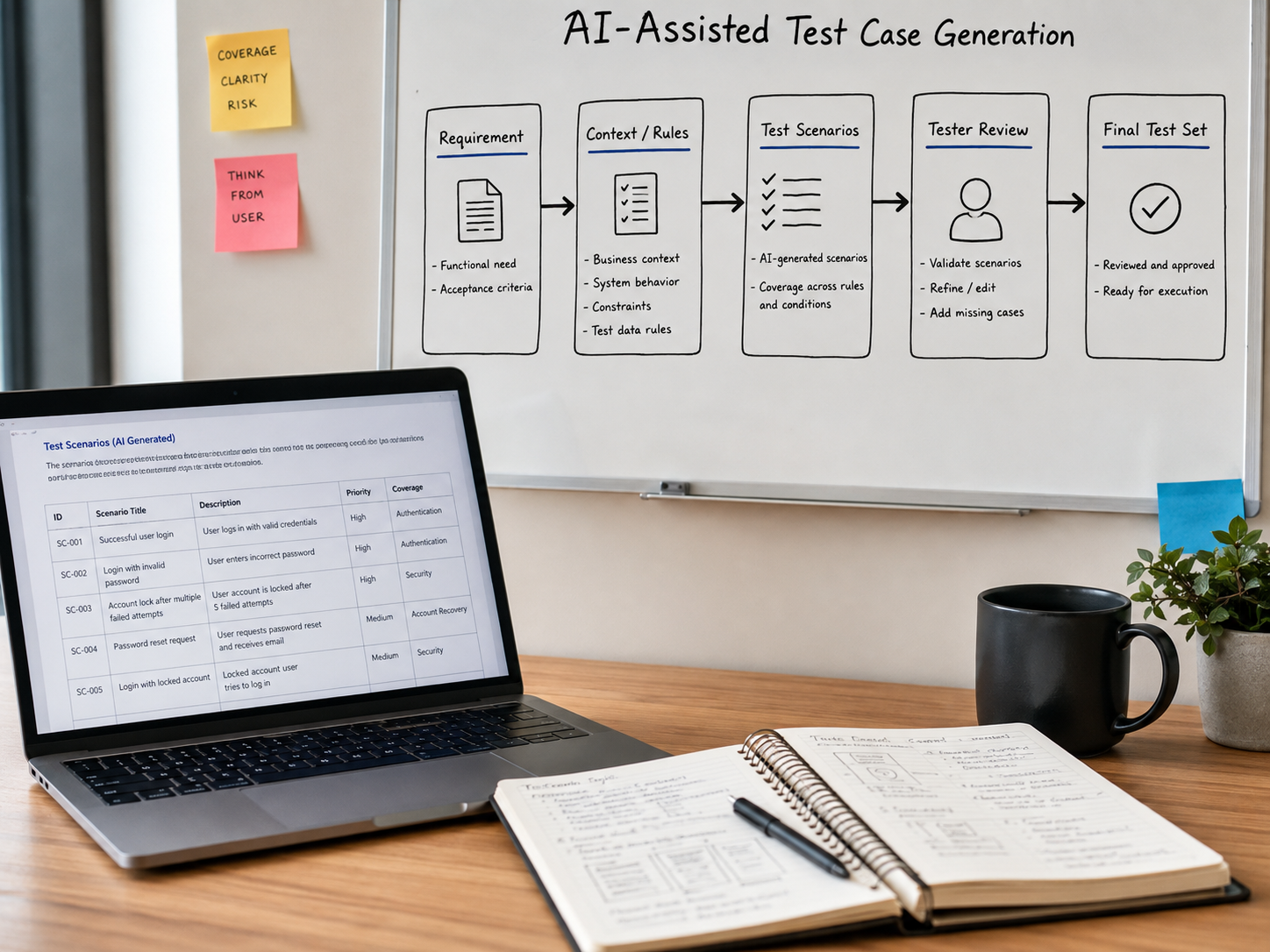
The basic flow can look like this:
Requirement
    ↓
Understand Context
    ↓
Identify Rules and Risks
    ↓
Generate Test Scenarios
    ↓
Review and Challenge
    ↓
Refine
    ↓
Approved Test Set
AI can assist in the middle of this flow.
It should not automatically own the final decision.
A practical model is:
Requirement
    ↓
AI Analysis
    ↓
AI-Generated Scenarios
    ↓
Tester Review
    ↓
Risk / Coverage Check
    ↓
Refinement
    ↓
Final Test Cases
That human review step matters.
Because generating twenty test cases is easy.
Knowing whether those twenty test cases are the right twenty is where testing experience still matters.
Step 1: Start With the Requirement
Suppose we have this requirement:
As a registered user,
I should be able to reset my password
using my registered email address.
Before generating anything, the requirement should be understood properly.
An AI agent can start extracting information such as:
Actor:
Registered user

Action:
Reset password

Input:
Registered email address

Expected outcome:
Password reset process starts successfully

Possible dependencies:
Email service
Authentication service
Password policy
Reset-token service
User database
Already, the requirement is becoming more testable.
But there are still questions.
For example:
How long is the reset link valid?

Can the link be reused?

What password rules apply?

What happens after too many reset requests?

Should the system reveal whether an email exists?

What happens if email delivery fails?
These are exactly the kinds of gaps AI can help surface.
Step 2: Generate Scenarios, Not Just Test Cases
I prefer starting with scenarios rather than immediately generating detailed step-by-step test cases.
Why?
Because scenarios allow us to think about coverage first.
For the password-reset example, an AI agent might suggest:
1. Reset password using a valid registered email

2. Reset password using an unregistered email

3. Use an expired reset link

4. Attempt to reuse an already consumed reset link

5. Enter a password that does not meet policy

6. Enter matching valid passwords

7. Enter mismatched password and confirmation values

8. Request multiple reset emails rapidly

9. Attempt reset for a locked account

10. Email service unavailable

11. Reset token is malformed

12. Reset token belongs to another user
Now we have something useful to review.
The AI has saved time by expanding the initial thinking.
But we should not stop here.
Step 3: Challenge the Generated Scenarios
This is where the tester becomes important.
Ask:
Are there duplicates?

Are any scenarios meaningless?

Are important business risks missing?

Are security scenarios covered?

Are boundaries covered?

Are integration failures covered?

Are we testing implementation details
instead of business behaviour?
For example, AI might generate these:
Reset password with invalid email

Reset password with unknown email

Reset password with email not in database
Those may effectively represent the same scenario.
Keeping all three creates volume.
It does not necessarily create more coverage.
So the tester may combine them into:
Reset request using an email
that is not associated with an account.
This is one reason AI-generated test cases should be reviewed rather than simply accepted.
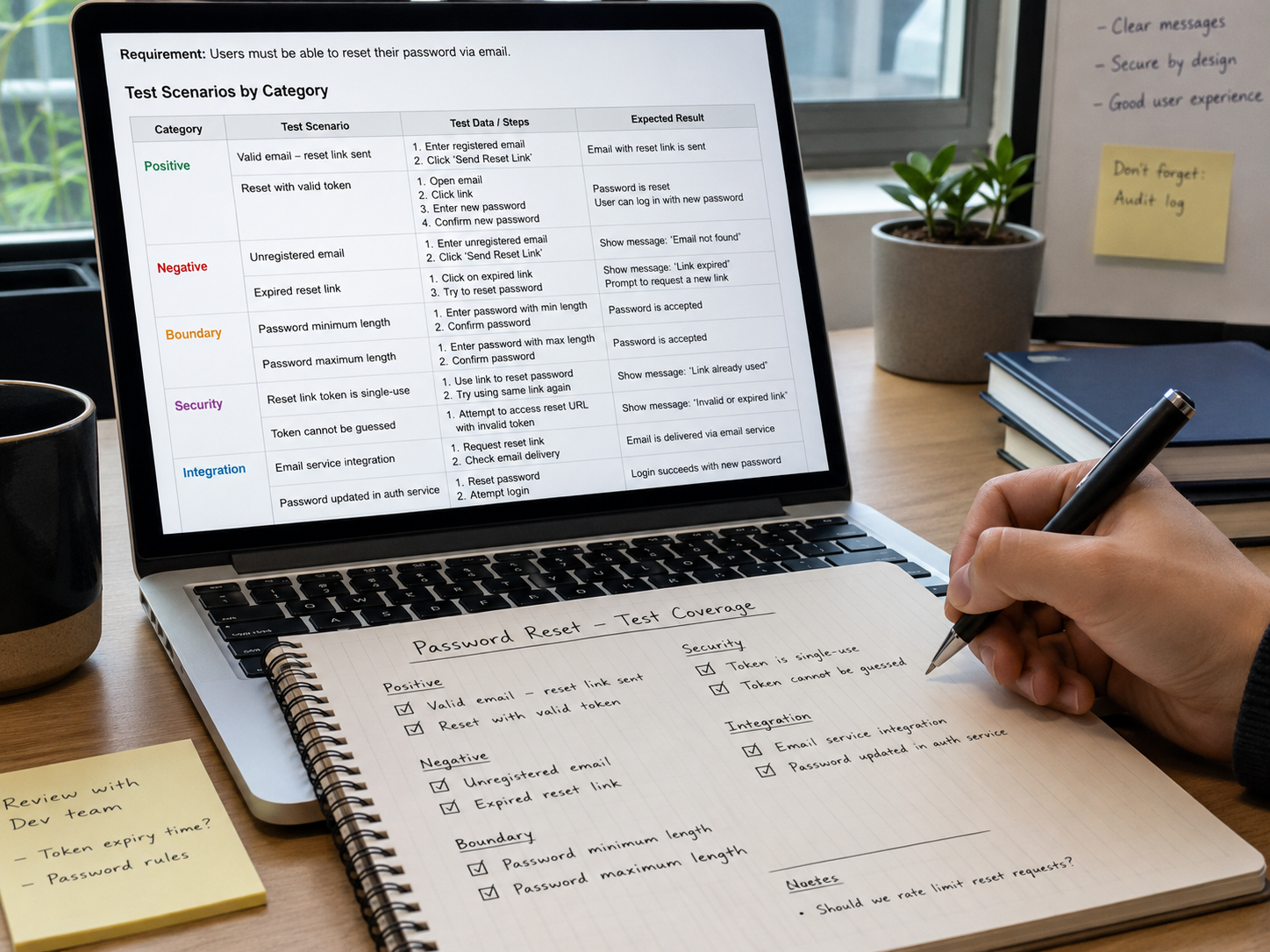
Step 4: Think in Test Categories
One useful way to improve AI-generated testing is to ask for scenarios by category.
Instead of:
Generate test cases.
think in terms of:
Positive
Negative
Boundary
Security
Integration
Data
Error handling
Recovery
Accessibility
Performance
For our password-reset example:
Positive
Registered email
Valid token
Valid new password
Successful reset
Negative
Unknown email
Invalid token
Expired token
Password mismatch
Boundary
Password exactly at minimum length
Password one character below minimum
Password exactly at maximum length
Password one character above maximum
Security
Reset link reused
Token modified
Token used for another account
Repeated reset requests
User enumeration attempt
Integration
Email provider unavailable
Authentication service timeout
Database update succeeds but notification fails
This produces much stronger coverage than asking for “10 test cases”.
Step 5: Turn Good Scenarios Into Test Cases
Once the scenarios have been reviewed, detailed test cases can be created.
For example:
Test Case: Successful Password Reset
Precondition:
User has an active registered account.

Input:
Registered email address.

Steps:
1. Open Forgot Password.
2. Enter registered email.
3. Submit request.
4. Open reset link.
5. Enter valid new password.
6. Confirm password.
7. Submit.

Expected:
Password is changed successfully.
Reset token becomes invalid.
User can log in using the new password.
Old password no longer works.
Notice something important.
The expected result is not just:
Success message displayed.
We are validating the business outcome.
That makes the test much more meaningful.
AI Can Also Help Find Missing Requirements
This may actually be more valuable than test-case generation itself.
Look again at the original requirement:
As a registered user,
I should be able to reset my password
using my registered email address.
There is a lot it does not tell us.
For example:
Reset token expiry?

Password complexity?

Rate limiting?

Account-lock behaviour?

Audit logging?

Email delivery expectations?

Token reuse?

Existing session behaviour after reset?
An AI agent can flag these gaps before testing even begins.
That changes the workflow from:
Requirement
    ↓
Testing
to:
Requirement
    ↓
Requirement Challenge
    ↓
Clarification
    ↓
Testing
Finding ambiguity before development is usually much cheaper than discovering it after implementation.
The Input Matters More Than People Think
AI-generated testing has the same basic limitation as any other analysis.
Poor input usually creates poor output.
Compare these two prompts.
Weak Input
Generate test cases for password reset.
The AI has very little context.
Now compare it with:
Analyse the following password-reset requirement.

Users authenticate using email.

Reset links expire after 15 minutes.

Links may only be used once.

Passwords must contain 12-64 characters.

After five reset requests within 10 minutes,
additional requests must be temporarily blocked.

Do not reveal whether an email exists in the system.

Identify:
- positive scenarios
- negative scenarios
- boundary conditions
- security risks
- integration failures
- missing requirements
The second input will usually produce a much more useful result.
So the quality equation looks more like:
Good Context
     +
Clear Business Rules
     +
AI Analysis
     +
Tester Judgement
     =
Better Test Design
Not:
Requirement + AI = Perfect Tests
Where Domain Knowledge Becomes Important
Imagine an AI agent is testing an online banking transaction.
It might generate:
Valid transfer
Invalid account
Insufficient funds
Incorrect amount
Network failure
Useful.
But somebody who understands banking may also think about:
Daily transfer limit

Account restrictions

Currency conversion

Fraud controls

Duplicate payment prevention

Cut-off times

Reversal behaviour

Regulatory requirements
That knowledge does not magically appear simply because an AI model is involved.
The richer the domain context available to the system, the more useful the generated testing can become.
This is why enterprise AI agents may eventually combine:
Requirements
+
Business rules
+
Architecture
+
Historical defects
+
API specifications
+
Existing tests
+
Production incidents
+
Domain knowledge
to create much more relevant testing recommendations.
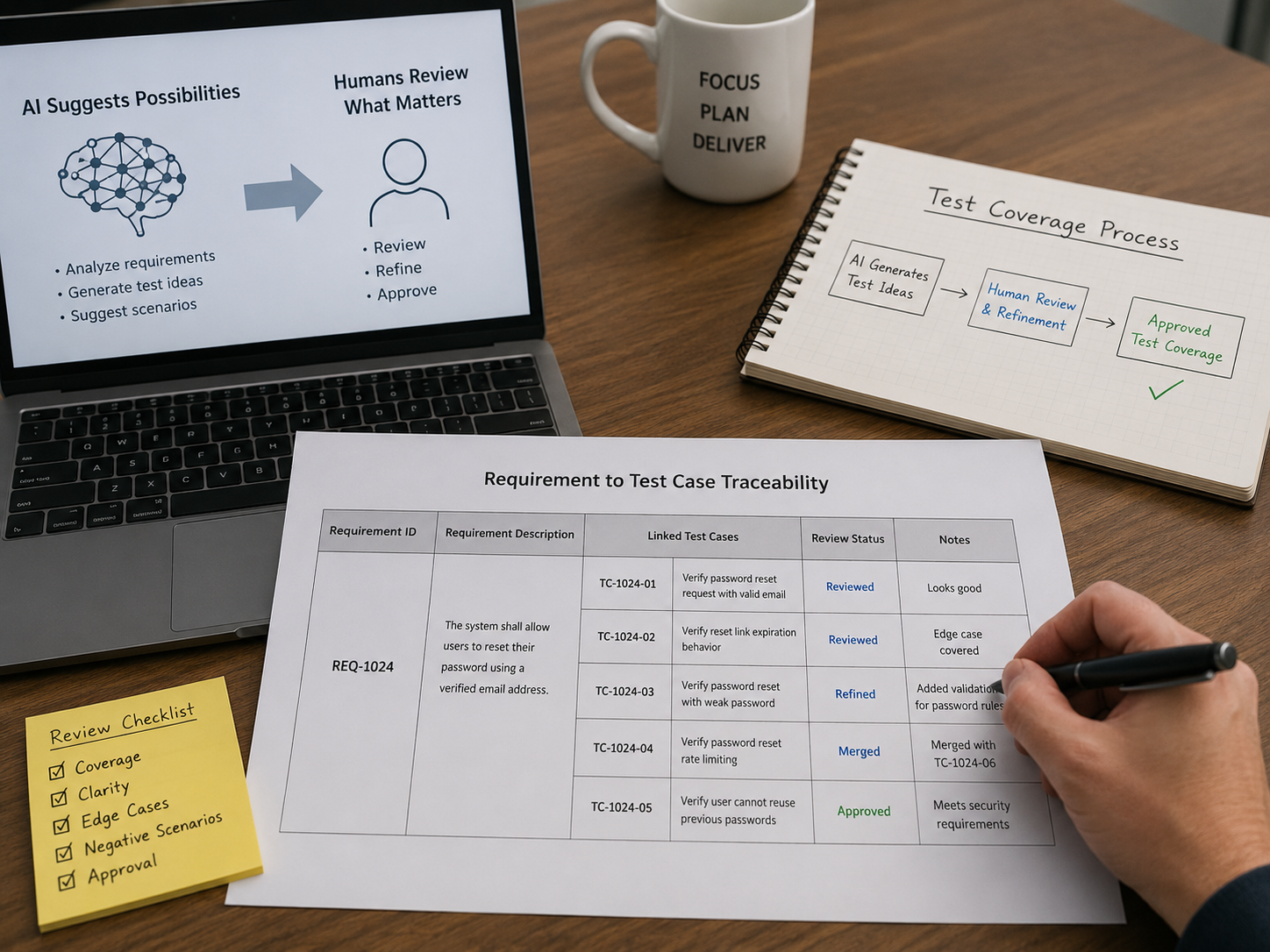
Traceability Still Matters
Another useful capability is linking generated tests back to the requirement.
For example:
REQ-101
Password Reset

   ├── TC-101 Valid reset
   ├── TC-102 Unknown email
   ├── TC-103 Expired token
   ├── TC-104 Reused token
   ├── TC-105 Password minimum boundary
   └── TC-106 Email service unavailable
Now we can ask:
Which requirements have tests?

Which risks are covered?

Which tests came from which requirement?

What changed when the requirement changed?
This becomes particularly useful in larger systems where hundreds of requirements and thousands of tests exist.
Confidence Should Come From Coverage, Not Quantity
Suppose AI generates:
147 test cases.
That sounds impressive.
But another AI system generates only:
32 test cases.
Which one is better?
We cannot answer from the number.
The useful questions are:
Did we cover the business rules?

Did we cover the highest risks?

Did we test boundaries?

Did we test failures?

Did we consider security?

Did we remove duplicates?

Can we trace tests back to requirements?
Thirty thoughtful scenarios may be much more useful than 147 repetitive ones.
So I would avoid measuring AI testing success by:
Number of test cases generated.
A better measure is:
Useful coverage generated.
A Practical AI-Assisted Testing Flow
A simple working model could look like this:
┌───────────────────────┐
│     REQUIREMENT       │
└───────────┬───────────┘
            ↓
┌───────────────────────┐
│   AI REQUIREMENT      │
│      ANALYSIS         │
└───────────┬───────────┘
            ↓
┌───────────────────────┐
│ Identify Rules, Risks │
│ Boundaries and Gaps   │
└───────────┬───────────┘
            ↓
┌───────────────────────┐
│ Generate Test         │
│ Scenarios             │
└───────────┬───────────┘
            ↓
┌───────────────────────┐
│ Remove Duplicates     │
│ and Weak Scenarios    │
└───────────┬───────────┘
            ↓
┌───────────────────────┐
│ Tester Review         │
│ and Refinement        │
└───────────┬───────────┘
            ↓
┌───────────────────────┐
│ Approved Test Set     │
└───────────────────────┘
The important part of this diagram is not the AI box.
It is the complete flow.
AI assists.
Testing judgement remains.
Where This Can Become More Powerful
Test generation is only the starting point.
Once the workflow is structured, an AI agent could potentially help with:
Requirement
    ↓
Risk analysis
    ↓
Test scenarios
    ↓
Test data
    ↓
Automation candidates
    ↓
Automation code
    ↓
Execution results
    ↓
Failure analysis
    ↓
Coverage gaps
That starts becoming much more interesting than simply producing a list of test cases.
The agent becomes part of the Quality Engineering workflow.
Not the replacement for the tester.
My View
AI can make test design faster.
That part is already becoming obvious.
But speed is not the most interesting benefit.
The bigger opportunity is helping testers think wider.
Finding conditions they may not immediately notice.
Challenging incomplete requirements.
Suggesting boundaries.
Identifying negative paths.
Surfacing integration risks.
Connecting requirements with test coverage.
That can make the tester's starting point much stronger.
But there is one principle I would keep.
AI generates possibilities.

Humans decide what matters.
Good testing has never been about producing the maximum number of test cases.
It is about asking the right questions about risk, behaviour and failure.
AI can help us ask more of those questions, faster.
Used that way, AI does not remove the tester from test design.
It gives the tester another very capable pair of eyes.